

 English
 العربية
 اردو
اردوHow to become an Accredited Service Provider (ASP) in Oman
· 9 min
The full accreditation route through the Fawtara Portal, from log-in to test results — taken from the Oman Tax Authority's own service provider manual.
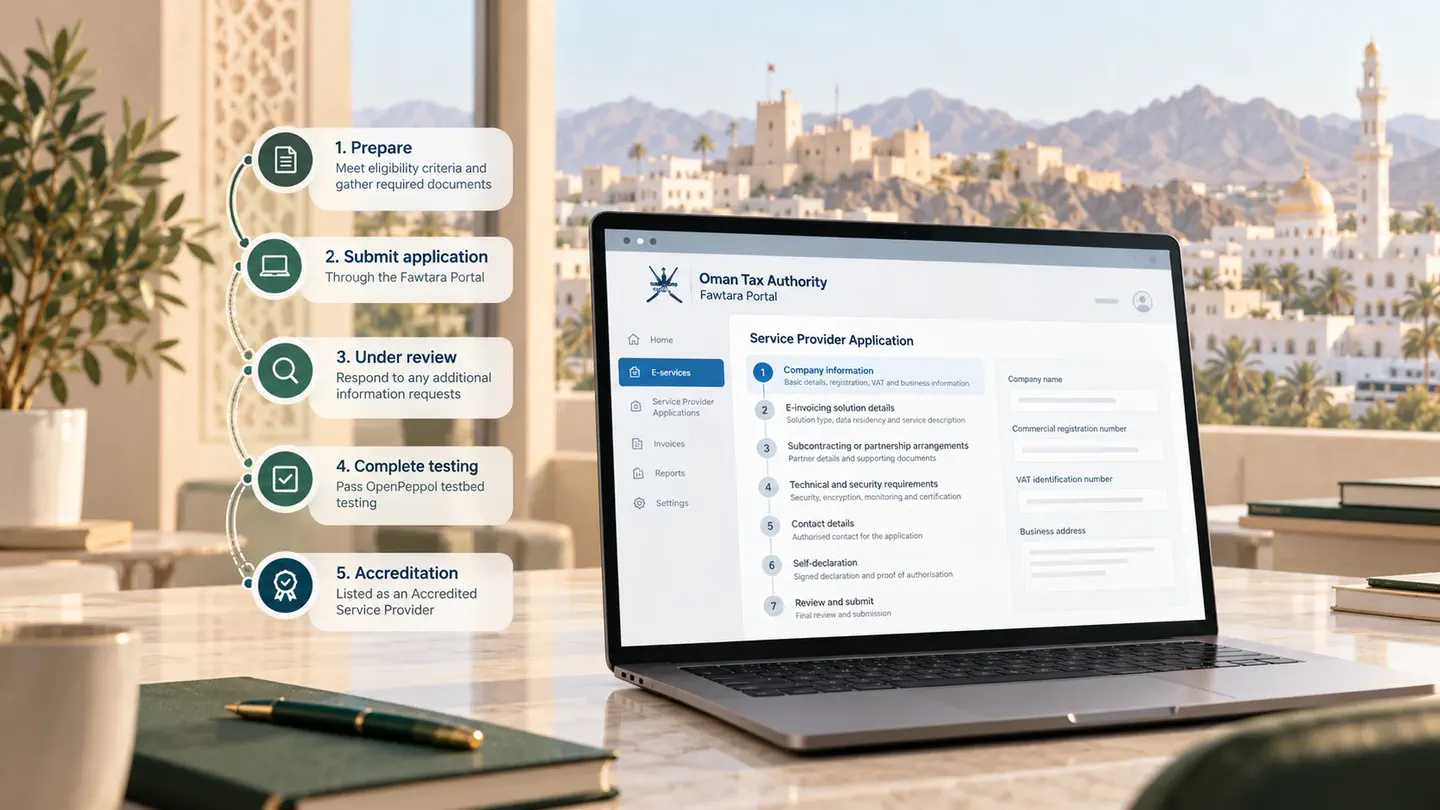
An Accredited Service Provider — an ASP — is the company that carries e-invoices onto the Fawtara network on a taxpayer's behalf. In the Oman Tax Authority's five corner model they are corners two and three.
Accreditation is not a registration form. It is a reviewed application with eligibility criteria, documentary evidence, a security assessment and a testing stage. This is the route as the Oman Tax Authority's own service provider manual sets it out.
Before you start
- Your organisation meets the minimum eligibility and accreditation criteria published by the Oman Tax Authority.
- Your supporting documents are already in electronic form: commercial registration, financial statements, certificates, technical and security documentation.
- You can get into the Fawtara Portal. The username and password, mobile number or ID card you already use for the Tax Authority's TMS portal work here too.
- Your team understands the five corner model and that a service provider occupies corners two and three.
Only users with an active TIN associated with a Commercial Registration Number see the service provider functions at all.
Getting in
From the Fawtara Portal homepage, choose Submit Service Provider Application. Authentication is either through THEQA, using Civil ID credentials and Mobile ID, or with the username and password issued by the Tax Authority.
The application, section by section
From the portal, open E-services → Service Provider Applications, then Submit New Application. Read the procedure, criteria and required documents page before pressing Start Application — it is the clearest statement of what is expected of an applicant.
1. Company information
Company name, commercial registration number and expiry, business address, VAT identification number, website, and whether the company is registered in a special zone in Oman. Then the commercial registration upload, your e-invoicing related activities, paid-up capital, Riyadh card holder status, years of operation, parent company details, relevant certificates, and whether you intend to provide services to yourself or to others.
2. E-invoicing solution details
The trade name of the solution, whether your company or parent company already provides e-invoicing in another country, which country, and the country of data residency. Then a description of the services, and whether the solution is built in-house or licensed from a third party.
3. Subcontracting or partnership arrangements
A straight yes or no. If yes, the partner type, country of registration, partner or sub-contractor name, a detailed overview, and any supporting upload.
4. Technical and security requirements
Six uploads, and this is the section that fails applications:
- The e-invoicing technical design document
- Proof of multifactor authentication
- Proof of encryption at rest
- Proof of encryption in transit
- Proof of security monitoring
- Audited ISO/IEC 27001 certification
Check each file name appears in its field after uploading. Save as Draft if you need to stop.
5. Contact details
First and last name, designation, email and contact number with the +968 country code. This has to be someone who can actually answer an Oman Tax Authority query about the application.
6. Self-declaration
Download the official template, have it signed and stamped by the authorised signatory, and upload it together with proof of authorisation — a memorandum of association, a power of attorney or articles of association. The declaration covers the absence of bankruptcy, insolvency or criminal cases.
Submission and what follows
The summary page shows every section for final review. Submitting asks you to confirm, then returns an application number and a status of Under Review.
- Additional information required. If the Tax Authority needs more, the status says so. Open the application from the actions menu, answer in the comments field, attach what is asked for, and submit.
- Pending testing. Once approved to test, complete OpenPeppol testbed testing and submit the results through Submit Test Results on the application's actions menu.
- Production certificate. After the Oman Tax Authority reviews and approves the test evidence, the remaining step is obtaining a production PKI certificate from OpenPeppol.
Withdrawal and amendment
An application can be withdrawn at any stage before final approval, through the three-dot actions menu, with a mandatory reason. A withdrawn application is closed and cannot be reopened, so this is not a way to pause. Amendment is the way to change an existing application; depending on what changed, it is either auto-approved or sent back to the Oman Tax Authority for review.
The two stages that take longest are the security evidence and the testbed. Neither can be started the week the application is written.
After accreditation
Accredited providers appear on the Oman Tax Authority's public list of accredited service providers, with contact details and data residency, visible before and after log-in. Taxpayers connect to you from that list — which is covered in connecting to an ASP.
The benefits the Tax Authority names are the ability to provide compliant e-invoicing services to taxpayers in Oman, recognition as an Accredited Service Provider, increased trust from taxpayers, and clear alignment with national regulations, technical specifications and security requirements.
This article summarises the Oman Tax Authority's Service Provider Registration User Manual. Confirm the current criteria on the Fawtara website before applying — they are updated.